


Navisphere Carrier
4.5698.00 Reviews
App Specs
- Version
- 2.30.1
- Updated On
- License
- Free
- Downloads
- 100,000+
- Developer
- C.H. Robinson Worldwide, Inc.
- Categories
- Maps & Navigation
- Platform
- Android
Screenshots
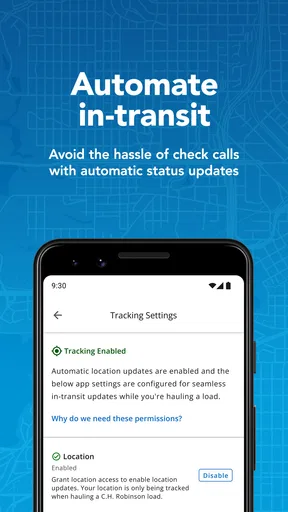
 Analysis by AppCompare
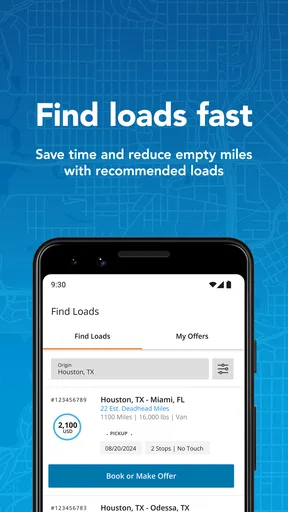
Choosing a load-board app is less about finding the prettiest map and more about deciding which part of a carrier’s day needs the most help. I look at four things first: whether the app helps me find suitable truckloads, how quickly I can act on an opportunity, how useful tracking is after booking, and whether the workflow feels practical from a phone. Navisphere Carrier is built around that specific carrier workflow rather than general road navigation, so it deserves attention from owner-operators and fleet teams who want freight search and shipment visibility in one place.
In my experience, the important distinction is simple: this is not a replacement for a driving-navigation app. It is a freight-management tool in the Maps & Navigation category, developed by C.H. Robinson Worldwide, Inc. Its purpose is to help carriers find, book, and track truckloads from a mobile device. That focus makes it more useful for someone arranging work than for a driver who only needs turn-by-turn directions.
How to decide whether Navisphere Carrier fits your operation
The first question is how you currently find loads. If you already work through C.H. Robinson and want a direct mobile route into that freight network, this app has a clear reason to exist. If your work comes from several unrelated brokers, private customers, or dispatch software, the value depends on whether this particular load board represents enough of your daily business to justify another app in your routine.
I would also consider who will use it. An owner-operator may appreciate being able to check opportunities without returning to a desktop. A small fleet manager may use it to keep an eye on booked work while drivers are on the road. A driver who has no role in selecting freight may get less from it, especially if dispatch handles every booking and the driver only needs instructions and communication.
The app is free, which lowers the barrier to testing it. It is rated for Everyone, runs on Android devices using version 7.0 or later, and the current version is 2.30.1. Those details matter for older work phones: before planning a full rollout, I would install it on the actual devices used by drivers rather than assuming every phone in the fleet will behave the same way.
Its public reception is encouraging without being a reason to skip practical testing. Navisphere Carrier has an average rating of 4.5 from around 1.6 thousand ratings, with over 100 thousand installs. I read that as a sign that the basic concept works for a meaningful group of carriers, not as proof that every workflow will suit every business. Freight operations vary too much for a single rating to answer questions about dispatch habits, device age, or preferred brokers.
What I look for before relying on a load-board app
Search speed is only one part of the decision. I want to know whether the app reduces the number of steps between noticing a load and taking action. A good mobile workflow should make it easy to review an opportunity while parked, decide whether it fits the truck’s route and schedule, and keep the resulting shipment accessible afterward.
Worth Reading Before You Choose

EA SPORTS FC Mobile 26 Is a Bigger Football Game, but It Takes Time

Flipboard Shows What News Apps Must Do Beyond the Feed

Switching to Android Auto Means Rethinking Your Driving Routine

Google Calendar Makes a Crowded Week Easier to Manage

Ludo King Makes the Most of the Minutes Between Plans

Baby Panda World Brings Quick Play to Modern Phones, but Its Game Library Feels Busy
I also pay attention to the handoff between office and road. A load board can be excellent for a dispatcher but awkward for the person who must actually move the freight. Navisphere Carrier makes the most sense when the same mobile workflow supports both the commercial side of booking and the operational side of tracking. That does not mean it replaces every dispatch conversation; it means it can reduce the need to manage the entire process through scattered messages and browser tabs.
My practical test would be a complete cycle rather than a quick glance. I would search for a realistic truckload, inspect the information needed to judge it, book one only when it genuinely fits, then return later to locate the shipment and check its tracking status. Testing only the search screen can hide the friction that appears after a load has been accepted.
Where the app is strongest
The strongest part of Navisphere Carrier is its narrow purpose. General map apps help drivers plan roads, traffic, and destinations, but they are not designed to connect a carrier with available truckloads. Traditional desktop load boards can be powerful, yet they are less convenient when a small operator is away from the office. This app sits between those two habits: it brings freight discovery and shipment follow-up to the device already carried in the cab or dispatch office.
I especially like the idea of separating freight decisions from route navigation. When I am evaluating a load, I need to think about the business fit first: where it starts, where it ends, whether it works with the truck’s schedule, and what it does to the next day’s plan. A navigation app is useful afterward, but it does not answer the first question. Navisphere Carrier is aimed at that earlier decision point.
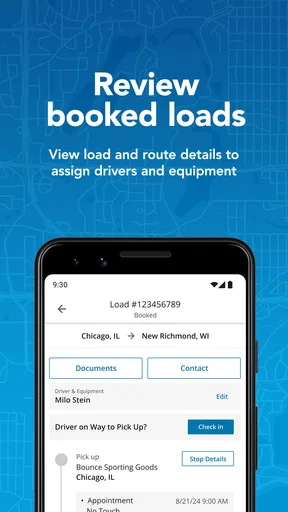
Tracking is another meaningful advantage. Booking a load is not the end of the job; it creates a shipment that needs attention as it moves through pickup and delivery. Having a mobile place to follow booked truckloads can help an owner-operator stay organized without relying entirely on memory or a separate office screen. For a small team, that shared visibility may be more valuable than an extra collection of search filters.
A useful, less obvious workflow is to treat the app as a planning checkpoint rather than something opened only when a truck is empty. I would review possible work before the current trip ends, compare the next opportunity with the truck’s expected location, and avoid making a rushed decision after delivery. That habit can make the load board more useful because it turns it into part of the day’s planning rhythm instead of an emergency search tool.
A realistic day with Navisphere Carrier
Imagine I am running a single truck and expect to finish a delivery in the afternoon. During a parked break, I open the app and look for a truckload that could follow the current job. I am not using it to choose a highway; I am checking whether the next piece of work makes sense for the truck’s location and schedule. If the opportunity fits, I can move toward booking without waiting to return to a laptop.
After the load is booked, I would use the same app as a reference point for the shipment rather than rebuilding the details from text messages. Later, I can check the load’s progress while coordinating the rest of the day. The benefit is not that the phone magically solves dispatching. The benefit is that the search and tracking stages belong to one carrier-focused tool, which can reduce context switching.
For a small fleet, the scenario changes slightly. A manager may use the app to identify work while a driver remains focused on the road. The manager can then pass along only the information the driver needs, while keeping the booking and tracking workflow organized on the office side. This division is useful when the person choosing freight is not the person holding the phone in the cab.
There is also a safety advantage to the right routine, even without treating the app as a driving tool: I would use it while parked, not while moving. Freight decisions require attention, and a load-board screen is a poor substitute for safe driving. The app fits best into planned stops, pre-trip preparation, and office work—not improvised browsing at highway speed.
Small habits that make the mobile workflow better
My first tip is to define the decision before opening the app. Know the truck’s likely empty location, available time, equipment situation, and acceptable direction. Without that preparation, it is easy to browse attractive-looking loads that create a poor repositioning choice. The app can surface opportunities, but the carrier still has to judge whether the opportunity belongs in the schedule.
My second tip is to treat booking and tracking as separate checkpoints. Finding a load is an active search task; following a booked load is an organization task. I would not assume that remembering the booking is enough. After accepting work, I would return to the shipment view and make sure I understand where to find it again, especially before handing responsibility to another person.
My third tip is to test the app during a quiet period before making it part of a time-sensitive dispatch process. Use a normal device, the same account arrangement the operation expects to use, and a realistic load-search scenario. This reveals whether the interface feels comfortable on the phone, whether the office and driver understand the same workflow, and whether the app actually saves time for that particular team.
A fourth trade-off is worth highlighting: mobile convenience can encourage overchecking. Constantly refreshing for the perfect load may distract from the current shipment and create indecision. I would use a clear rule for when to search, what qualifies as a useful opportunity, and when to stop looking. The tool works best when it supports a dispatch plan rather than replacing one.
Where another type of tool may fit better
Navisphere Carrier is not the obvious choice for every transportation task. If I mainly need live road directions, traffic awareness, fuel-stop planning, or a broad map of destinations, I would choose a dedicated navigation app instead. Those tools are designed around driving, while this one is designed around freight opportunities and booked-load tracking.
If my business depends on several brokers and I need one screen that combines many independent marketplaces, a broader multi-source load-board service may fit better. The trade-off is that broader coverage can bring a busier interface and more sorting work. Navisphere Carrier is more focused, so its usefulness is strongest when its available freight aligns with the carrier’s actual relationships and lanes.
A full transportation-management system may also be better for a larger operation that needs extensive dispatch coordination, accounting, document handling, driver messaging, or fleet-wide reporting. I would not expect a focused carrier app to replace every back-office process. Its appeal is the direct mobile handling of finding, booking, and tracking truckloads, not the promise of being an entire company operating system.
There is a similar distinction between a load board and a private customer portal. A carrier with steady contracted freight may have little need to browse for additional truckloads. In that case, the app could be useful only if C.H. Robinson work forms a meaningful part of the operation. Otherwise, the familiar tools already used by the customer or dispatcher may create less change.
These alternatives are not automatically better. They are better for different priorities. A general navigation app wins when the truck already has work and needs road guidance. A broad marketplace wins when variety across sources matters most. A larger management platform wins when the office needs many connected functions. Navisphere Carrier wins when a carrier wants a focused mobile path from freight discovery to shipment follow-up.
The real cost of switching
Because the app is free, the main switching cost is not a subscription bill. It is the time required to change habits. Drivers and dispatchers may already know where to search, where bookings are recorded, and how tracking updates are shared. Introducing another workflow can create confusion if the team does not agree on which system is the source of truth.
I would avoid switching everything at once. Start with one owner-operator or one small dispatch group, then compare the complete process: how long it takes to find a suitable load, how clearly the booking is understood, and how easy it is to return to tracking later. The goal is not to count taps. The goal is to see whether fewer separate conversations and screens are needed to manage the same shipment.
There is also a training cost, even with a relatively focused app. A driver needs to know when to use it, when to park before interacting with it, and what information should be passed to dispatch. A manager needs to know how the mobile workflow fits with existing records. I would create a short internal routine rather than assuming that everyone will use the app in the same way immediately.
Older devices deserve a deliberate check. The minimum operating-system requirement is Android 7.0, so compatibility is broad, but compatibility alone does not guarantee a comfortable experience on a small or aging work phone. Screen size, battery condition, connectivity, and the phone’s general responsiveness can all affect whether mobile freight work feels efficient.
Finally, I would judge the change by operational clarity, not novelty. If the app helps the team find relevant work and keep booked shipments visible, it has earned a place in the workflow. If it merely duplicates a process that already works across a dispatcher’s tools, switching may add another place to check without delivering a meaningful benefit.
Who should use it, and who should skip it?
I would recommend trying Navisphere Carrier if you are an owner-operator, a small carrier, or a fleet manager who wants mobile access to C.H. Robinson truckloads. It is particularly suitable when you often work away from a desk and need to move from load search to booking and tracking without depending on a desktop-only routine.
I would also consider it for a team that needs a clearer handoff between the person finding freight and the person moving it. The focused design can be an advantage when the operation does not need a huge collection of unrelated tools. A free app with a carrier-specific purpose is easy to evaluate without making an immediate financial commitment.
I would skip it, or at least place it lower on the list, if your work is almost entirely fixed-contract freight, if you need one marketplace spanning many unrelated sources, or if your main requirement is turn-by-turn navigation. I would also be cautious about making it the center of a large fleet’s entire technology stack without testing how it fits with existing dispatch and administrative systems.
My recommendation after weighing the trade-offs
Navisphere Carrier is a sensible specialist tool, not a universal trucking app. I like its clear emphasis on finding, booking, and tracking truckloads from a phone, and I think that focus gives it a practical edge over ordinary map apps for carriers who need freight access rather than directions. The free price and broad device support make a trial straightforward, while its 4.5 average from around 1.6 thousand ratings suggests that the approach has worked for many users.
My recommendation is strongest for carriers already interested in C.H. Robinson freight and for small operations that want a mobile-first workflow. I would install it, run a complete load cycle while parked, and compare the result with the current process before asking the whole team to change. That test will answer the questions that a store page cannot: whether the search feels efficient for your lanes, whether booking is clear enough for your dispatch style, and whether tracking genuinely keeps the shipment easier to manage.
For the right user, the app’s value is straightforward. It brings a focused freight workflow closer to the road without pretending to be a full navigation or fleet-management replacement. For the wrong user, its narrow scope becomes the limitation. I would choose it when direct access to this carrier marketplace and mobile shipment visibility matter more than collecting every possible freight source in one place.
Pros
- Real-time shipment visibility helps carriers track loads and delivery progress.
- Centralized load details reduce the need to manage information across multiple tools.
- Direct access to tender and appointment information improves dispatch planning.
- Electronic document features can speed up paperwork and delivery confirmation.
- Useful for carriers already working with C.H. Robinson’s logistics network.
Cons
- Most useful features depend on an active relationship with C.H. Robinson.
- The interface may feel complex for occasional or first-time users.
- Requires reliable mobile data for timely updates while on the road.
- Frequent notifications may become distracting during busy driving schedules.
- Some functions may vary depending on the shipment and carrier permissions.
FAQs for Navisphere Carrier
What is Navisphere Carrier used for?
Navisphere Carrier is a mobile tool for carriers and transportation professionals who manage loads through the C.H. Robinson network. After signing in, users can typically review available freight, search and accept suitable loads, check shipment information, update status milestones, and communicate while a load is in progress. It is mainly intended for approved carrier accounts rather than casual individual users.
Who can use the Navisphere Carrier app?
The app is designed for authorized carriers, fleet operators, dispatchers, and other transportation staff working with C.H. Robinson. You generally need valid carrier credentials and an active relationship with the platform before you can use its main features. If you are a driver or employee, your access may depend on the permissions assigned by your company administrator, so not every account will display the same options.
Can I find and book loads directly from Navisphere Carrier?
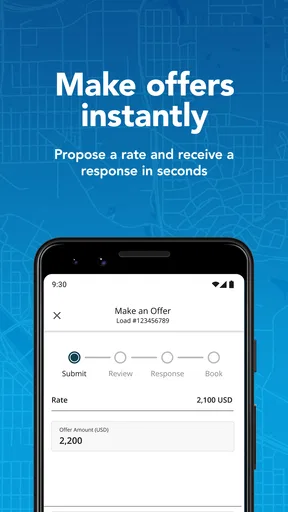
One of the app’s main purposes is to help eligible carriers manage available freight from a mobile device. Depending on your account, region, equipment type, and current platform rules, you may be able to search load details, review pickup and delivery requirements, and submit or confirm a booking. Availability is not guaranteed, and some loads may require additional approval or qualification before they can be accepted.
Can Navisphere Carrier be used to track shipments and send updates?
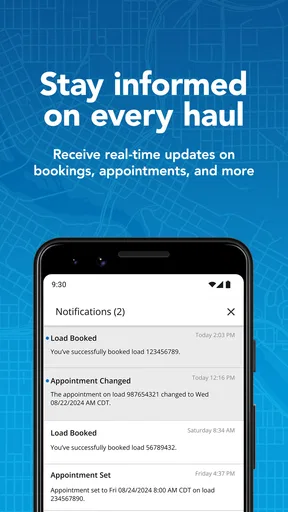
Navisphere Carrier is intended to support shipment visibility throughout the transportation process. Authorized users may be able to update arrival, pickup, transit, and delivery milestones, review appointment information, and share operational details with the brokerage team. The exact tracking functions can vary by shipment and account configuration. Accurate, timely updates are important because they help customers and logistics coordinators monitor the load.
Is Navisphere Carrier free, and what should I check before downloading it?
The application is generally provided as a business tool for carriers and does not normally require a separate consumer subscription to download. However, access to its services depends on having an eligible carrier account and compatible credentials. Before installing it, check that your Android or iOS device meets the current requirements, that your company uses Navisphere Carrier, and that you can receive login or verification messages.


